 Kidney Tracker
What to bring to a PD clinic review
How to arrive at a PD review with your fill, drain, weight and med list already in order.
A PD clinic review is a chance to go over how things have been going at home, and it helps to arrive with your records in order. This post is about the organising side — what kind of personal record is handy to bring — not about what your readings should be or what will be discussed clinically, which is for your own PD team. The aim is simply to make sure the writing-down you have already done is easy to pull together on the day.
Bringing your own copy of the numbers
Over the weeks between reviews, people on PD often keep an eye on fluid in and out, weight and a few other measures. If you have logged those in Kidney Tracker, they are already timestamped and charted, so you are not flicking back through a paper diary trying to find a figure. A printable report generated on your device gathers the dates you choose into one tidy summary you can take with you.
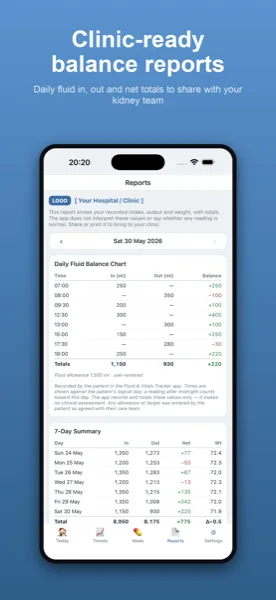
Fill, drain and weight at a glance
Because fill and drain are logged as fluid in and out, the report can show your running totals and net balance over the period, alongside your weight plotted as a line. The app presents what you entered without judging or flagging anything — the reading stays with your team, and your record is there to support the conversation, not replace it.
A medication list and questions, in one place
If a clinician asks what you are taking, your personal medication list is right there on your phone. Keeping everything — fluid, weight, results and medicines — in one app means you are less likely to forget something you meant to mention, and you can jot questions for the review wherever you keep your notes.
Private, and shared on your terms
Everything stays on your own iPhone. There is no account, nothing is uploaded, and the report is created locally and shared only where you decide. You choose exactly what to bring and what to show.
Less to remember on the day
The night before a review is a common time to panic about figures you meant to write down. Keeping the record as you go through the weeks takes that pressure away — by review day the work is already done, and pulling it together is a couple of taps. You are not relying on memory for a reading from a fortnight ago, and you are not transcribing a paper diary into something legible. The record is simply there, dated and in order, ready to bring.
You choose what to show
A tidy record does not mean handing over everything. The report covers the dates you select, and you decide whether to bring a printout, show it on screen, or simply use it to jog your own memory in the conversation. Because it is generated on your own device and nothing is uploaded, what you share is entirely your choice. The app lays out your figures plainly and leaves every reading of them to your PD team.
See the peritoneal dialysis page and the post on keeping a daily PD record at home. For appointments more generally, what to take to a kidney clinic appointment may help.
Kidney Tracker is a personal record-keeping tool. It is not a medical device and does not provide medical advice — always follow your own clinical team.
FAQ
Common questions
Keep your records in one private place
Kidney Tracker is in beta and free to try. Join through TestFlight — no account needed.
Join the beta on TestFlightiPhone only for now · Free during beta