 Kidney Tracker
Fluid and weight tracking for liver disease
If your team has asked you to weigh daily, watch your fluid and keep your blood results, here is a private place to keep all three together.
Living with liver disease often comes with a short list of numbers your team asks you to keep an eye on between appointments — typically your daily weight, how much you drink, and the blood results your clinic reads back to you. Kidney Tracker is built for kidney patients and works equally well for anyone asked to track fluids, weight and vitals, gathering those numbers into one calm, private record on your iPhone. It does the totalling and charting; you simply log.
Weigh daily and see the trend
If you have been asked to record your weight each day, the app makes it a few seconds' work and plots every reading on a chart. A gradual change is far easier to spot as a line than as a list, and the trend is something concrete to talk through at your next appointment. Kidney Tracker holds and charts the numbers you enter and does not interpret them — what they mean is a conversation for you and your clinical team.
Track fluid against your own figure
You can log what you drink in millilitres, and if your team has given you a daily fluid figure to keep to, you can set it as your own target. The Today screen then keeps a running total of your intake and shows how much of your target is left. Saved drink sizes, the Home-Screen widget, the Apple Watch complication and Siri all make logging a drink quick, so the running total reflects the whole day rather than the bits you remembered.
Keep your blood results in one place
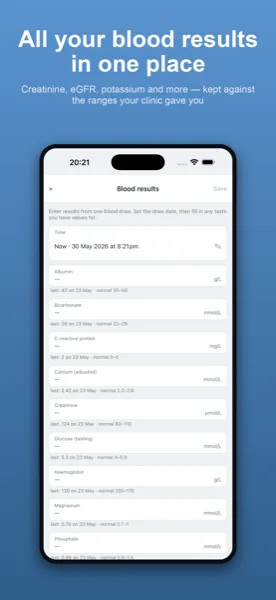
The values your clinic reads back to you are easy to lose track of on scraps of paper. In Kidney Tracker you can note the blood results you want to keep and follow each one over time on a chart, so your own record of those numbers stays tidy and in order. It is a personal log, kept the way you want it.
One report for an appointment
Because weight, fluid and blood results all live in the same app, you can bring them together in a single printable report when a review comes round. The report is generated on your device, the app keeps no copy, and it goes only where you choose to send it. If your team also asks you to note blood pressure or to keep a medication list with reminders, those fit in the same place too.
Private by default
There is no account, no sign-up, no analytics and no advertising. Everything you log stays in a database on your own iPhone, so your records are yours alone until you decide to share a report with someone.
Kidney Tracker is a personal record-keeping tool. It is not a medical device and does not provide medical advice — always follow your own clinical team.
FAQ
Common questions
Related ways to use Kidney Tracker
Keep weight, fluid and results together
Kidney Tracker is in beta and free to try. Join through TestFlight — no account needed.
Join the beta on TestFlightiPhone only for now · Free during beta