 Kidney Tracker
Monitoring fluid at home after surgery
After an operation, your team may ask you to keep an eye on what you drink and pass. Kidney Tracker does the adding up so you can just record the numbers.
Coming home after an operation often comes with a short list of things to watch. Among them, your clinical team may ask you to keep a record of how much you drink and how much you pass, and sometimes to weigh yourself each morning. On paper this means a clipboard by the kitchen, a running tally in your head, and a tired attempt to add it all up before a phone call or a follow-up appointment. Kidney Tracker replaces that with a couple of taps and lets your phone keep the totals.
Log intake and output as you go
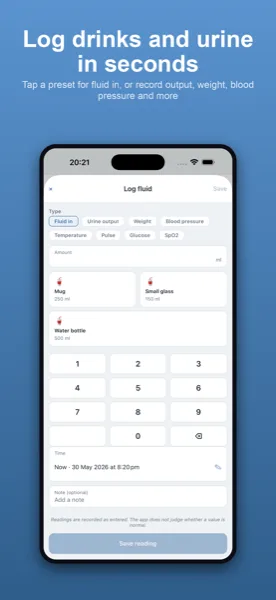
Every drink and every output is recorded in millilitres, each one separately. You can save the amounts you reach for most — a particular glass, a mug, a measured jug — so the entries you make over and over become a single tap. As soon as you add something, the Today screen updates a live running total of intake and a running total of output, with your net balance shown alongside. There is no arithmetic to do and nothing to remember; the number you might be asked for is simply there.
Totals against the target your team sets
If your team has given you a daily figure to aim around, you enter that target yourself and the app totals your intake and output against it. The target is just a number you choose, based entirely on the guidance you were given — Kidney Tracker does not suggest one and offers no opinion on what it should be. A configurable day-start hour means the daily total can line up with a 24-hour chart rather than resetting at midnight, which is handy if your team works to a particular cut-off.
Daily weight, plotted
Where you have also been asked to weigh yourself, you can record your weight each morning and watch it plotted over the days since you came home. Seeing the line rather than a column of figures makes a steady change easy to spot, and easy to describe to someone over the phone or at a clinic.
A clean record for your follow-up
When a check-in or appointment comes round, you can turn the days you have logged into a printable, shareable report. It is generated on your device and goes only where you choose to send it; the app keeps no copy and the developer never sees it. Instead of reconstructing a week from memory, you arrive with the record already made.
Private, with nothing to set up
There is no account and no sign-up. Everything you enter lives in a database on your own iPhone, with no analytics and no advertising. That also means the records are yours to delete — removing the app removes the data with it, so it is worth keeping your device backed up while you are using it. For a quick glance without opening the app, a Home-Screen widget and an Apple Watch complication can show today's running total, and Siri can add a drink by voice when your hands are full.
Kidney Tracker is a personal record-keeping tool. It is not a medical device and does not provide medical advice — always follow your own clinical team.
FAQ
Common questions
Keep your recovery records in one place
Kidney Tracker is in beta and free to try. Join through TestFlight — no account needed.
Join the beta on TestFlightiPhone only for now · Free during beta