 Kidney Tracker
How to record daily fluid intake at home
How to keep a simple, reliable daily fluid log at home, with the totalling done for you.
Keeping a daily record of how much you drink sounds simple until you try to do it across a busy day, with cups, glasses and bottles all different sizes and a memory that fades by teatime. This post is about the record-keeping only — not how much anyone should drink, which is a question for your own kidney team. Here we look at how to keep a tidy daily fluid log at home so that, whatever figure you have been asked to keep an eye on, the writing-down is the easy part.
Decide what counts as one entry
The trick with any home log is to make each entry small and quick. In Kidney Tracker you record fluid in millilitres as you go, so a mug of tea, a glass of water or a can each becomes its own timestamped entry rather than something you try to remember and add up later. Logging little and often is far more reliable than reconstructing the whole day from memory at bedtime.
Let the phone do the totalling
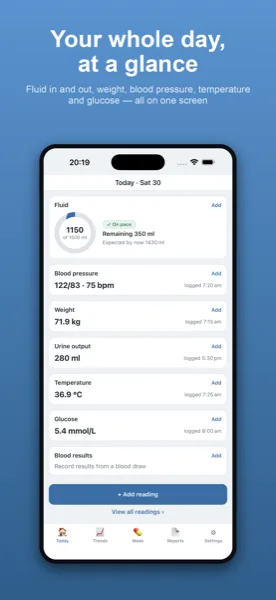
The Today screen keeps a live running total, so you always know where the day stands without doing sums. If your team gave you a daily figure to work to, you enter it as your own target and the app shows the net balance against it. The app does not suggest a target or tell you whether yours is right — it simply totals what you enter against the number you set.
Make it hard to forget
A record only helps if you actually keep it. Because the app lives on your phone, adding a drink takes a couple of taps, and you can log hands-free with Siri when your hands are full. A home-screen widget and an Apple Watch complication show the running total at a glance, which acts as a gentle nudge through the day. You can also note fluid out if that is part of what you keep, and the same running tally covers both.
Pulling a few days together
Over a week, patterns are easier to see drawn out than listed. Your daily totals can be charted, and when an appointment comes up a printable report generated on your device gathers the dates you choose into one tidy summary. Everything stays on your own iPhone, with no account and nothing uploaded, and you decide who ever sees the report.
Counting things that are not glasses of water
One reason daily fluid is awkward to log on paper is that it does not only come as drinks. Soup, ice lollies, the milk on cereal and the water taken with tablets are all fluid, and people often forget them. Because each entry in the app is just a number in millilitres, anything you have been told to count can go in the same place — you decide what counts, based on your team's guidance, and the app simply adds it to the total. There is no special category to wrestle with and nothing is left out because it did not look like a drink.
What a week of records can show
Keeping the log for a few days has a quiet benefit beyond any single total: you start to see your own routine. Drawn out as a chart, the busy days and the quiet ones become visible, which can be useful background for a conversation with your team. The app draws the picture but never reads it for you — it does not say a day was high or low, only shows what you recorded. That keeps the record honest and leaves the meaning where it belongs.
If you have just been handed a chart, the post on what input and output mean on a fluid chart explains the columns, and the fluid intake tracker page covers day-to-day logging. People on a set limit may also find managing a fluid restriction on haemodialysis useful.
Kidney Tracker is a personal record-keeping tool. It is not a medical device and does not provide medical advice — always follow your own clinical team.
FAQ
Common questions
Keep your records in one private place
Kidney Tracker is in beta and free to try. Join through TestFlight — no account needed.
Join the beta on TestFlightiPhone only for now · Free during beta