 Kidney Tracker
What does input and output mean on a fluid chart?
A plain look at the in and out columns on a fluid chart — and how to keep the same running tally privately on your phone.
"Input and output" is one of the most-searched phrases people meet when they or a relative are handed a fluid chart in hospital. This post does not try to explain what your own numbers mean or what they should be — that is a conversation for your clinical team. Instead it answers the practical, organisational question: once you understand the idea of input and output, how do you keep that same record neatly at home? Kidney Tracker is built for exactly that kind of writing-down, and it never interprets a single figure for you.
What the words describe, in plain terms
On a paper fluid chart, "input" is simply the column where fluid going in is written down, and "output" is the column for fluid coming out. They are headings on a record, nothing more. The point of the chart is to keep a running tally so the total can be added up at the end of a shift or a day. What the totals are taken to mean, and whether yours are where your team wants them, is entirely a clinical matter — we leave that with the people looking after you.
Keeping the same two columns on a phone
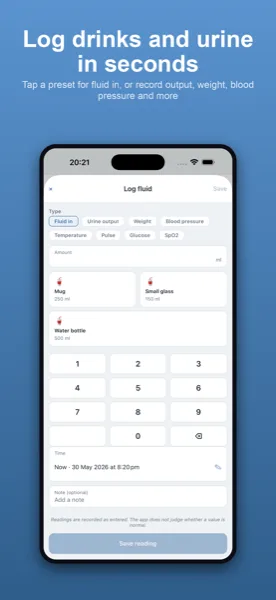
Kidney Tracker mirrors that structure. You log fluid in and fluid out in millilitres, each entry stamped with the time you made it. The Today screen keeps the running totals for you, so there is no adding up by hand and no risk of a column going astray. If you were given a daily figure to aim at, you enter it yourself as a target and the app shows your net balance against it — the number is yours, copied from your team, not anything the app decides.
Why a digital tally is easier to keep up
The hard part of any paper chart is remembering to write on it and then totalling it correctly. A phone is usually closer to hand than a clipboard, and the totals are always current. You can add an entry in a couple of taps, or hands-free with Siri if you are mid-task, and a home-screen widget or Apple Watch complication shows where the day stands at a glance. Nothing is judged or flagged — the app holds the tally and leaves the reading to you and your team.
Turning the record into something you can share
When an appointment comes round, a printable report generated on your own device pulls the in, out and net figures together over the dates you choose, so you can show a tidy record rather than a stack of scraps. Everything stays on your iPhone — there is no account and nothing is uploaded — and the report is created locally and shared only where you decide.
For more on the same idea, see the fluid balance chart page and the post on replacing the paper fluid balance chart. If you are setting up a daily routine, how to record daily fluid intake at home walks through it step by step.
Kidney Tracker is a personal record-keeping tool. It is not a medical device and does not provide medical advice — always follow your own clinical team.
FAQ
Common questions
Keep your records in one private place
Kidney Tracker is in beta and free to try. Join through TestFlight — no account needed.
Join the beta on TestFlightiPhone only for now · Free during beta