 Kidney Tracker
How to track blood pressure at home
How to keep your home blood pressure readings tidy and in one place, drawn as a line.
Keeping a blood pressure record at home is one of the most common things people are asked to do, and "how to track blood pressure at home" is a heavily searched question. This post answers only the record-keeping part of it. It does not cover what your readings should be, when to take them, or how to read them — those belong with your own clinical team. What it covers is how to keep the readings you take in one tidy, private place.
Capturing a reading
Whatever monitor you use, the numbers it shows can be entered into Kidney Tracker in a few seconds. You record the systolic and diastolic values, and the pulse too if your monitor shows it. Each reading is stamped with the date and time automatically, so you never have to remember when you took it, and morning and evening readings sit in order without any effort.
Seeing it as a line, not a list
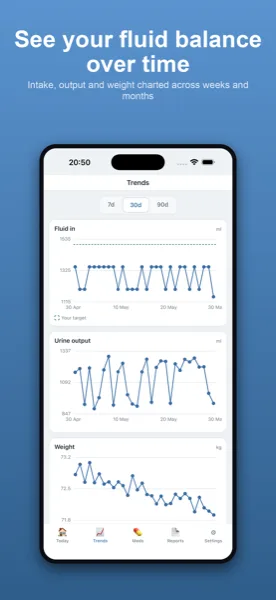
A long list of numbers is hard to take in. The app plots your readings over time so the picture is easier to glance at, for you and for whoever you choose to share it with. The app does not interpret the line, mark anything as high or low, or offer an opinion — it simply draws what you entered. Any reading on whether your numbers are where they should be stays entirely with your team.
Building a habit that sticks
Home readings only help if they are kept up. Because the app is on your phone, logging a reading is quick, and a home-screen widget or Apple Watch complication keeps your recent figures in view. If you take readings at set times, you can also keep a medication list and reminders in the same app, so the whole routine lives in one place rather than across notebooks and sticky notes.
Ready to share
When you next see your team, a printable report generated on your device gathers your readings over the dates you choose into one clean summary. Everything stays on your own iPhone — no account, nothing uploaded — and the report is created locally and shared only where you decide.
Morning and evening, without the guesswork
Many people are asked to take readings at more than one time of day, and remembering which reading was when is exactly where paper notes get muddled. Because every entry in the app is stamped with the date and time automatically, a morning and an evening reading simply sit in order, and you never have to write the time yourself or work out later which was which. Over weeks, that ordering is what makes the chart meaningful rather than a jumble.
Keeping the numbers, not the judgement
It is worth being clear about what the app deliberately does not do. It will not tell you a reading is high or low, will not colour anything red, and will not nudge you toward a number. That is not a missing feature — it is the point. A home record is most trustworthy when it is just a faithful copy of what your monitor showed, with the reading of those numbers left entirely to your team. The app keeps the figures honest and stays out of the clinical conversation.
See the blood pressure log page for day-to-day use, and the posts on blood pressure and weight tracking with CKD and tracking weight and blood pressure after a transplant for related routines.
Kidney Tracker is a personal record-keeping tool. It is not a medical device and does not provide medical advice — always follow your own clinical team.
FAQ
Common questions
Keep your records in one private place
Kidney Tracker is in beta and free to try. Join through TestFlight — no account needed.
Join the beta on TestFlightiPhone only for now · Free during beta