 Kidney Tracker
Tracking weight and blood pressure after a kidney transplant
Two small daily readings, kept in one place and plotted over time, so the figures are tidy before you ever sit down at clinic.
When you come home after a kidney transplant, two of the most common things a team asks people to keep an eye on are their weight and their blood pressure. This post is about the practical side of recording them — getting the numbers down reliably and keeping them in one place — and not about what the readings mean. The clinical side belongs entirely with your own transplant team, who gave you the instructions you are working to.
Why two readings can become a chore
On their own, weighing yourself and taking a blood pressure reading are quick. The difficulty is repetition. Done every day, often at the same time each morning, they quietly turn into two separate records that are easy to muddle — a figure scribbled on the back of an appointment letter, a reading remembered but not written down, a notebook left in another room. After a few weeks the record has gaps, and a record with gaps is harder to trust and harder to talk through.
One place for both numbers
Kidney Tracker lets you keep both readings in the same app. You record your weight in a couple of seconds, and you note a blood pressure reading as systolic and diastolic, with pulse too if you take it. Each entry is timestamped, so you always know when it was taken. Because the two live side by side, you are not flipping between a scale notebook and a separate blood pressure sheet — it is one tidy log.
Seeing the line, not just the latest number
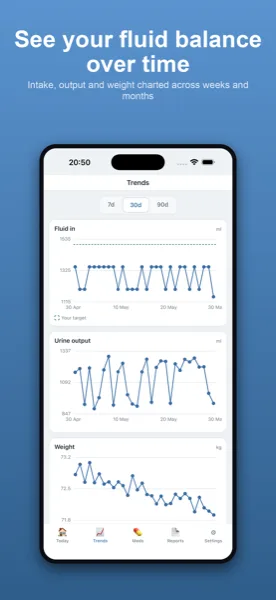
A single reading tells you very little about how things are moving. Kidney Tracker plots each measure on its own chart, so instead of a column of figures you see the shape over days and weeks. A weight that drifts steadily, or a run of blood pressure readings that looks different from the week before, is far easier to spot — and far easier to describe to your team — when you can see the line. To be clear about where the app stops: it draws what you entered. It does not decide whether a reading is high or low, does not flag anything as normal or abnormal, and offers no advice of any kind.
A glance without opening the app
Because these readings are part of a daily routine, Kidney Tracker makes them quick to reach. A home-screen widget can show your most recent figures, and on Apple Watch a complication puts the latest entry on your watch face. When you want to add a reading hands-free — perhaps while you are still standing on the scales — you can use Siri to quick-log it. None of this changes what is recorded; it just lowers the effort of keeping the habit going.
Tidy and ready for clinic
Early after a transplant, appointments come round often, and that is exactly when a complete record earns its keep. You can turn your entries into a printable, shareable report on your device and bring it along, rather than reconstructing the last fortnight from memory at the desk. The report is generated on your iPhone and goes only where you choose to send it — the app keeps no copy and the developer never sees it. There is no account and nothing is uploaded; everything stays on your own device.
If weight is the measure you most want to follow, the weight tracking page goes into more detail, and the blood pressure log page covers recording readings over time. You may also find the post on recording blood results between transplant clinic visits useful, or the broader kidney transplant page.
Kidney Tracker is a personal record-keeping tool. It is not a medical device and does not provide medical advice — always follow your own clinical team.
FAQ
Common questions
Keep your transplant readings in one place
Kidney Tracker is in beta and free to try. Join through TestFlight — no account needed.
Join the beta on TestFlightiPhone only for now · Free during beta