 Kidney Tracker
Keeping a medication list for kidney care
How to keep a personal medication list and reminders in one place — set by you, from your team's plan.
Kidney care often comes with several medicines, taken at different times, and keeping track of them is a common worry. This post is about keeping a personal medication list and reminders — the organising side. It is not about which medicines to take, what doses are right, or when to take them. Every one of those is set by your own clinical team, and the app never advises on any of them. What it does is help you hold the list they have given you in one tidy place.
Writing down the list you were given
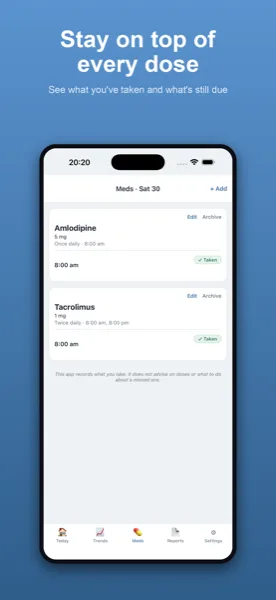
In Kidney Tracker you can keep a personal list of your medicines, set up from your team's instructions. The list is yours to maintain — when something changes, you update it. The app does not suggest medicines, change anything, or check doses; it simply holds the record you enter so it is all in one place rather than spread across boxes, leaflets and memory.
Reminders you set yourself
For the times you have been told to take each medicine, you can set local reminders on your iPhone. These are notifications on your own device — nothing goes through a server — and you choose the times from your team's instructions. The reminder is a nudge to follow the plan you already have, not advice from the app about timing.
Keeping it current for appointments
A medication list is most useful when it is up to date, and having it on your phone means it is always with you. If a clinician asks what you are taking, you can read it straight from the app. A printable report generated on your device can include your list alongside your other records, ready to share as you wish.
One private place
Your medication list sits in the same app as your fluid, weight, blood pressure and blood results, so the whole picture is together. Everything stays on your own iPhone — no account, nothing uploaded — and you decide who ever sees it.
When the list changes
Medicines in kidney care are not always fixed, and a list that is out of date is worse than no list at all. Keeping yours in the app means that when your team makes a change, you update the entry and the reminders follow. There is no waiting for a new printout and no crossing-out on paper. The app does not make the change for you or check it — you enter exactly what you have been told — but it keeps the current picture in one place so the version on your phone is the version you are actually taking.
Why the reminders stay on your device
The reminders are deliberately local notifications on your own iPhone. Nothing about your medicines is sent anywhere, which keeps a sensitive list private to you. It also means the nudges work without an account or a connection. They are there to help you follow the plan your team set, at the times you entered — a prompt, not a prescription. The clinical decisions remain entirely with the people who gave you the plan.
See the medication reminders page for day-to-day use, and the post on keeping a medication routine after a transplant for a fuller routine. The features page lists everything else the app records.
Kidney Tracker is a personal record-keeping tool. It is not a medical device and does not provide medical advice — always follow your own clinical team.
FAQ
Common questions
Keep your records in one private place
Kidney Tracker is in beta and free to try. Join through TestFlight — no account needed.
Join the beta on TestFlightiPhone only for now · Free during beta