 Kidney Tracker
Keeping records at CKD stage 4
How to keep a fuller, tidy home record as appointments come closer — about the writing-down only.
At a more advanced stage of chronic kidney disease, people are often seen more often and asked to keep a fuller record between appointments. This post is about that record-keeping only. It does not define the stage, say what you should track, or interpret any reading — those are for your own kidney team. What it offers is a practical way to keep a broader set of records tidy when there is a little more to keep an eye on.
When the record grows
Earlier on, a light record of one or two measures may be enough. Later, people often mention keeping more — perhaps fluid in and out, weight, blood pressure and the blood results read back to them. Kidney Tracker is built to grow with that. You can add measures as your routine changes, all in the same app, without starting again or moving between tools.
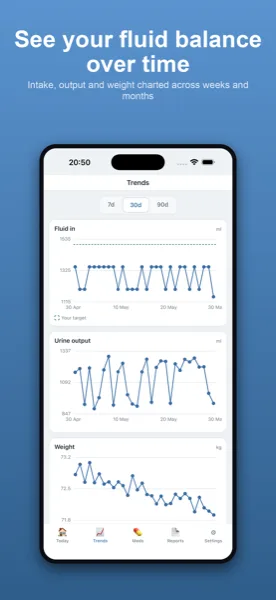
Fluid, weight and blood pressure together
Fluid is logged in millilitres, in and out, with a live running total and a net balance against any target you set yourself. Weight is a couple of taps and is charted. Blood pressure is recorded as systolic and diastolic with pulse if you take it. Each is timestamped and plotted, and the app totals and draws what you enter without ever judging a value or suggesting a target — those numbers come from your team.
Keeping a fuller record manageable
More to record can mean more to forget, so the app keeps each entry quick — a couple of taps, or Siri when your hands are full — and shows recent figures on a home-screen widget or Apple Watch complication. Blood results and a medication list with reminders live in the same place, so a broader routine still sits in one private app rather than several.
Ready for closer follow-up
With appointments often closer together, a steady home record means each visit starts from something tidy. A printable report generated on your device gathers the dates you choose into one summary to share as you wish. Everything stays on your own iPhone — no account, nothing uploaded.
One app instead of several
As the number of things people keep an eye on grows, the temptation is to spread them across a notebook, a notes app and a couple of monitors that each keep their own history. The trouble is that nothing then sits side by side. Keeping fluid, weight, blood pressure, results and medicines in one app means the whole record is in one timeline, and a single report can pull from all of it. The app does not connect the measures or draw conclusions across them — it simply keeps them together so you, and your team, can see them in one place.
Steady records between closer visits
When appointments come closer together, the gap you are recording across is shorter, which can actually make a habit easier to keep — there is less time to fall out of it. A steady record across those shorter gaps means each visit has fresh, tidy figures to start from rather than a scramble the night before. As always, the app holds the figures and leaves every reading to your team; its job is only to make sure nothing is lost between one appointment and the next.
For the wider view, see what people often track through the CKD stages and the post on keeping a fluid and symptom diary with advanced CKD. The chronic kidney disease page covers everyday logging.
Kidney Tracker is a personal record-keeping tool. It is not a medical device and does not provide medical advice — always follow your own clinical team.
FAQ
Common questions
Keep your records in one private place
Kidney Tracker is in beta and free to try. Join through TestFlight — no account needed.
Join the beta on TestFlightiPhone only for now · Free during beta