 Kidney Tracker
Recording blood results between transplant clinic visits
The numbers your clinic reads back to you are easy to lose between visits. Keeping them in one place lets you follow the line instead of hunting through letters.
After a kidney transplant, blood tests are a regular part of the schedule, and at each visit your clinic usually reads some values back to you. Many people like to keep their own note of those numbers between appointments. This post is about doing that tidily — writing the values down and following them over time — and not about what any value means. Interpreting blood results is your transplant team's job, and Kidney Tracker stays well clear of it.
Why these numbers are easy to lose
Blood results arrive in all sorts of ways — read out at a desk, written on a slip, mentioned in a phone call, buried in a letter. Each one on its own is easy to note, but across weeks of appointments they scatter. By the time the next visit comes round, the value you wanted to compare against is somewhere in a pile, and the thread is lost. A single place to put each number as you hear it keeps that thread intact.
Your own note, in one place
Kidney Tracker lets you record the blood values your clinic gives you, so your personal copy lives in one spot rather than across texts, letters and memory. You enter the numbers exactly as they were read to you. The app is simply the notebook — it does not fetch results from anywhere, and it does not connect to any hospital system. What you write down is what you heard from your team.
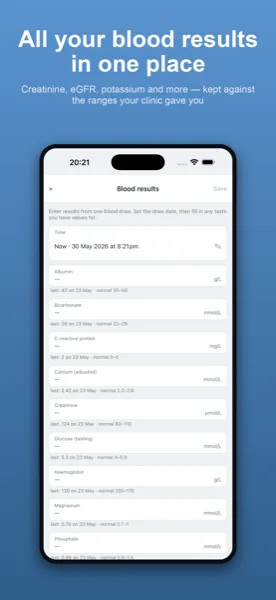
Following the line across visits
Each value you record is plotted on a simple chart, so you can see how a number has moved from one visit to the next rather than comparing entries in a list. Seeing the shape can make it easier to follow your own progress and easier to ask a clear question at your next appointment. Here is the firm boundary, though: the chart shows what you entered and nothing more. Kidney Tracker does not say whether a value is normal or abnormal, does not mark anything as concerning, and never offers advice. Any reading of the results stays with your clinic.
Everything alongside, ready for the next appointment
Because your blood results sit in the same app as your fluid, weight, blood pressure and medication records, you have one tidy picture to bring to a visit. You can turn it into a printable, shareable report generated on your device, then print or share it as you choose. The report is created on your iPhone and the app keeps no copy — there is no account, nothing is uploaded, and the developer never sees your data. Your records stay private to you.
The features page covers the charts and report in more detail. You may also find the posts on tracking weight and blood pressure after a transplant and keeping a medication routine after a transplant useful, or the broader kidney transplant page.
Kidney Tracker is a personal record-keeping tool. It is not a medical device and does not provide medical advice — always follow your own clinical team.
FAQ
Common questions
Keep your results in one place
Kidney Tracker is in beta and free to try. Join through TestFlight — no account needed.
Join the beta on TestFlightiPhone only for now · Free during beta