 Kidney Tracker
Keeping a personal log of your kidney blood results
How to keep your own copy of the results your clinic reads back, and follow them on a chart.
Blood results are central to kidney care, and many people want their own copy rather than waiting for the next letter. This post is about how to keep a personal log of the results your clinic reads back to you — not what any result means, whether yours are where they should be, or what to do about them. All of that is for your own kidney team. Here we focus on the simple act of writing the numbers down and keeping them in order.
Noting the values you are given
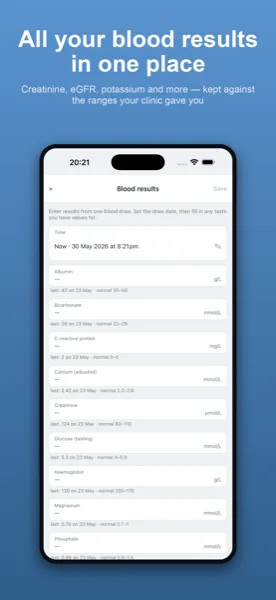
At an appointment, or over the phone, your clinic often reads back a handful of values. Kidney Tracker lets you note those down so you have your own record between visits. Each entry is dated, so when the next set comes through you can see your own copy lined up in order rather than scattered across letters, texts and memory.
Following them on a chart
Once you have a few entries, the app can plot a value over time so the trend is easier to glance at than a column of figures. This is purely your own record drawn out — the app does not judge a value, mark anything as out of range, or offer any interpretation. Whether a result is reassuring or needs action is a conversation for your team, and your copy simply helps you follow along.
Keeping it alongside everything else
Because your blood results sit in the same app as your fluid, weight, blood pressure and medications, you have one private picture rather than several. That can make appointments easier, as you can see your recent readings and your own copy of the numbers together. A printable report generated on your device pulls the dates you choose into one summary to share as you wish.
Private by default
Everything stays on your own iPhone. There is no account, nothing is uploaded, and the report you generate is created locally and shared only where you decide. Your personal copy of your results is exactly that — personal.
Why people like their own copy
Letters arrive late, get filed away, or never quite cover the value you were curious about. Keeping your own note of the figures your clinic reads back means you are not waiting on the post or scrolling through messages to remember last time's number. The record is yours, on your phone, dated and in order. None of this replaces what your clinic holds — it simply gives you a personal copy alongside it, which many people find makes appointments feel less like starting from scratch each time.
One value at a time is enough
You do not have to log everything your clinic measures. Many people note just the one or two values they have been asked to keep an eye on, and that is perfectly workable. Each is entered as a number with a date, and the chart for that value builds up over time. The app makes no judgement about which values matter — that is for your team — and it never marks a figure as good or bad. It only keeps the copy you choose to keep.
For more on this between appointments, see recording blood results between clinic visits, and the features page for everything the app records. The post on what people often track through the CKD stages sets it in context.
Kidney Tracker is a personal record-keeping tool. It is not a medical device and does not provide medical advice — always follow your own clinical team.
FAQ
Common questions
Keep your records in one private place
Kidney Tracker is in beta and free to try. Join through TestFlight — no account needed.
Join the beta on TestFlightiPhone only for now · Free during beta